By Admin··14 min read
Building Your Home Office: Essential Computer Accessories Checklist 2026

On this page
The way we work has changed forever. Remote work and hybrid arrangements have made home offices as important as any corporate workspace, and professionals across India are investing seriously in creating setups that boost productivity, reduce fatigue, and project professionalism during video calls. Yet many home workers settle for inadequate setups, working hunched over laptops on dining tables with poor lighting and no external peripherals.
A well-equipped home office does more than look impressive on video calls. The right accessories reduce physical strain, improve focus, accelerate workflows, and create clear psychological separation between work and personal life. Investing thoughtfully in your workspace pays dividends through better output, reduced fatigue, and improved wellbeing.
This comprehensive checklist covers every essential accessory for a high-performance home office in 2026, from the must-have basics to the productivity-enhancing upgrades that transform ordinary workspaces into professional command centers. We have curated specific recommendations available at Swastik Online Store, with honest assessments of which accessories deliver genuine value versus which ones are nice-to-have luxuries.
Why Your Home Office Setup Matters More Than Ever
Before diving into the checklist, understanding the real impact of workspace quality helps justify investment decisions.
The Productivity Connection
Research consistently shows that workspace quality directly influences work output. Professionals working with proper monitors, ergonomic peripherals, and reliable accessories report measurably better focus and fewer errors compared to those working on bare laptops.
Specific measurable impacts include:
Dual Monitor Setups: Studies show 20-30% productivity increases for knowledge workers who switch from single to dual monitor configurations. The ability to reference documents while working eliminates constant window switching, reducing cognitive load significantly.
External Keyboards: Professionals using external keyboards report 15-25% faster typing speeds compared to laptop keyboards, particularly for those who type extensively. The improved key travel and tactile feedback reduce errors and fatigue.
Proper Seating and Ergonomics: While furniture falls outside this article's scope, accessories like monitor stands and laptop risers contribute to proper posture, reducing neck and back pain that cuts productivity and creates long-term health issues.
The Professional Image Factor
With video conferencing a permanent fixture of professional life, your home office background and audio/video quality directly affect how colleagues, clients, and superiors perceive your professionalism. A pixelated webcam, hollow audio from laptop speakers, and a cluttered background undermine credibility built through years of professional effort.
The right accessories eliminate these perception barriers, allowing your work quality to speak louder than your setup limitations.
The Essential Home Office Accessories Checklist
Category 1: Display and Visual Setup
Your display configuration represents the single most impactful upgrade available to home office workers. More screen real estate directly translates to less time switching between windows and more time actually working.
Primary External Monitor (Priority: Critical)
Working exclusively on a laptop screen creates unnecessary constraints. Even the best 15-inch laptop screen provides limited workspace for professionals managing multiple documents, spreadsheets, or applications simultaneously.
What to Look For in 2026:
- Minimum 24-inch screen size for comfortable productivity
- Full HD (1920x1080) resolution minimum, 1440p preferred
- IPS panel for accurate colors and wide viewing angles
- Anti-glare coating to reduce eye strain
- 75Hz or higher refresh rate for smoother scrolling
- Adjustable stand for proper ergonomic positioning
- HDMI and DisplayPort inputs for universal compatibility
Recommended Options:
Budget-Friendly Productivity: HP 24mh Monitor (24-inch, FHD)
- 24-inch FHD display
- Clean, minimal design suitable for home offices
- Multiple input options
- Reliable HP quality at accessible price
- Ideal for: Students, entry-level professionals, secondary monitors
- 100Hz refresh rate for smoother experience
- IPS panel for accurate colors
- Elegant white design complements modern home offices
- Ideal for: Design-conscious professionals wanting clean aesthetic
- Samsung panel quality
- Slim bezels for clean desk appearance
- Reliable brand with strong track record
- Ideal for: General productivity, multimedia consumption
LG 24-inch HD IPS Panel Monitor
- LG IPS panel technology
- Accurate colors for extended work sessions
- Premium feel at competitive pricing
- Ideal for: Professionals prioritizing display quality
AOC 23.8-inch Full HD IPS Gaming Monitor
- IPS panel with fast response time
- Smooth scrolling for code and documents
- Versatile for work and evening gaming
- Ideal for: Professionals who also game after work hours
Mid-Range Productivity Champions:
- VA panel for better contrast than IPS
- 75Hz refresh rate
- 4ms response time
- Excellent color depth for document work
- Ideal for: Professionals working with rich media content
Acer SA272E 27-inch Ultra Slim
- 27-inch for generous workspace
- 100Hz refresh rate, 1ms VRB response
- Ultra-slim 7.2mm profile
- Zero-frame design maximizes screen area
- Eye-care technology for reduced strain
- Built-in stereo speakers
- AMD FreeSync
- Ideal for: Professionals wanting premium 27-inch experience with built-in audio
Premium Upgrade:
BenQ GW2780 27-inch Ultra Slim Bezel
- BenQ eye-care technology reduces blue light and flicker
- Ultra-slim bezel design
- 27-inch screen for comfortable multitasking
- Excellent for all-day professional use
- Ideal for: Professionals spending 8+ hours at desk daily
- Dell premium display quality
- 27-inch for professional workspace
- IPS panel with accurate colors
- Clean, professional design
- Ideal for: Corporate professionals wanting premium brand trust
Lenovo ThinkCentre Tiny-in-One 24
- Unique dual-purpose monitor
- Compatible with Lenovo ThinkCentre Tiny desktops
- Professional Lenovo quality
- Ideal for: Lenovo desktop users wanting seamless integration
ViewSonic VX3276-2K-MHD 32-inch
- 32-inch 2K (2560x1440) display
- Maximum screen real estate for power users
- Immersive workspace experience
- Ideal for: Professionals needing maximum screen space for complex workflows
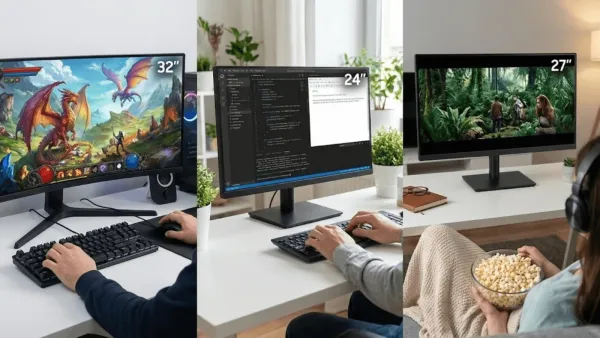
Monitor Size Guide for Home Office:
|
Room Type |
Recommended Size |
Resolution |
Why |
|
Small study/bedroom |
24-inch FHD |
1920x1080 |
Fits limited desk space |
|
Dedicated home office |
27-inch FHD/2K |
1920x1080 or 2560x1440 |
Optimal balance of space and detail |
|
Large home office |
32-inch 2K |
2560x1440 |
Maximum productivity workspace |
|
Dual monitor setup |
Two 24-inch |
1920x1080 each |
Widest combined workspace |
Category 2: Input Devices
Poor input devices create invisible productivity drains. Every extra click, imprecise cursor movement, and uncomfortable keystroke accumulates into hours of lost productivity and mounting physical strain over a working year.
Wireless Mouse (Priority: Critical)
A quality wireless mouse transforms desktop navigation, eliminating cable clutter while providing precision impossible with laptop trackpads.
What to Look For:
- Comfortable grip matching your hand size
- Precise optical or laser sensor
- Long battery life (minimum 6 months)
- Reliable wireless connectivity
- Ergonomic button placement
Recommended Options:
- Clean, reliable HP quality
- Comfortable everyday design
- Long battery life
- Universal USB receiver
- Ideal for: General professionals, students
- Dell build quality
- Ambidextrous design
- Smooth tracking
- Quiet click operation
- Ideal for: Office professionals, corporate setups
- Dual connectivity (USB + Bluetooth)
- Switch between two devices seamlessly
- Perfect for laptop and desktop users
- Long battery life
- Ideal for: Professionals using multiple devices (laptop + tablet)
Gaming-Grade Precision for Professionals:
- High DPI settings for precision work
- Customizable button mapping
- Ergonomic design for extended use
- Ideal for: Designers, CAD users, anyone needing precision
Logitech LightSync Gaming Mouse
- Logitech's renowned sensor precision
- Customizable DPI settings
- Ergonomic right-hand design
- Ideal for: Professionals wanting best-in-class precision
Wireless Keyboard and Combo Sets (Priority: Critical)
External keyboards provide better key travel, tactile feedback, and ergonomics compared to laptop keyboards, reducing typing fatigue during long work sessions.
Recommended Options:
HP Wireless Keyboard and Mouse Combo
- Matched keyboard and mouse set
- Shared USB receiver (single port)
- Full-size layout with number pad
- Quiet key operation
- Long battery life
- Ideal for: Home office beginners wanting complete input solution
- Dell professional pairing
- Full-size ergonomic layout
- Reliable wireless connectivity
- Corporate-grade build quality
- Ideal for: Professionals in corporate industries
Gaming Keyboard for Productivity:
- Backlit keyboard for dim lighting environments
- Precise mechanical-style keys
- Gaming mouse with adjustable DPI
- Complete input solution
- Ideal for: Professionals working in varied lighting, evening workers
- Backlit RGB illumination
- Responsive key switches
- Full-size layout
- Ideal for: Home office workers wanting keyboard illumination
Input Device Comparison Table:
|
Device Type |
Best For |
Key Feature |
Budget Impact |
|
HP Wireless Mouse |
General productivity |
Reliable, clean design |
Low |
|
Dell Wireless Mouse |
Corporate professionals |
Business aesthetic |
Low |
|
HP Dual Mode Mouse |
Multi-device users |
Bluetooth + USB switching |
Low-Medium |
|
Logitech Gaming Mouse |
Precision work |
Best-in-class sensor |
Medium |
|
HP Wireless Combo |
Beginners |
All-in-one solution |
Low-Medium |
|
Pro Backlit Combo |
Evening workers |
Keyboard illumination |
Medium |
Category 3: Audio Setup
Audio quality profoundly affects both your productivity and how colleagues perceive your professionalism during meetings. Laptop speakers and microphones rarely deliver acceptable quality for professional communication.
Speakers for Home Office (Priority: Medium-High)
External speakers transform your home office audio experience, making long music-assisted work sessions more pleasant and team calls clearer when using speakerphone mode.
Recommended Options:
- Clear audio for music and calls
- Compact design for desk placement
- Easy plug-and-play connectivity
- Ideal for: Professionals wanting background music during work
- Enhanced bass response
- Vibrant audio for creative professionals
- Compact footprint
- Ideal for: Content creators, creative professionals
Headset and Headphones (Priority: Critical for Video Callers)
Quality headsets eliminate background noise during calls, protect your privacy in shared spaces, and deliver clear audio for music and content.
Recommended Options:
- Crystal-clear microphone for call clarity
- Comfortable over-ear design
- Works beautifully for professional video calls
- Immersive audio for focus music
- Ideal for: Professionals on frequent video calls, remote team meetings
HP H10 Pro True Wireless Headphone
- True wireless freedom
- Professional audio quality
- Microphone for calls
- All-day comfort
- Ideal for: Mobile professionals, those wanting cable-free setup
Audio Setup Guide by Work Type:
|
Professional Type |
Audio Recommendation |
Why |
|
Frequent video caller |
HP H100 Headset |
Noise isolation, clear mic |
|
Music-assisted worker |
Multimedia Speakers |
Background audio |
|
Shared space worker |
True Wireless HP H10 |
Privacy without cables |
|
Content creator |
Speakers + Gaming Headset |
Versatility |
|
Quiet home office |
Speakers sufficient |
Background ambience |
Category 4: Storage Solutions
Modern professional work generates enormous amounts of data. Documents, presentations, design files, videos, and project archives accumulate rapidly, demanding reliable, fast storage solutions beyond your laptop's internal drive.
USB Flash Drives (Priority: Medium)
Essential for quick file transfers, presentations at client offices, and lightweight backups.
Recommended Options:
SanDisk Cruzer Blade 32GB USB 2.0
- Reliable SanDisk brand
- 5-year warranty
- Compact design
- Adequate for documents, presentations
- Ideal for: Basic file transfers, presentation backups
- USB 3.0 speed (10x faster than USB 2.0)
- 64GB capacity for larger files
- Fast video and photo transfers
- Ideal for: Frequent file transfers, multimedia content
- Budget-friendly option
- Sufficient for document transfers
- Compact and portable
- Ideal for: Occasional users, document-only transfers
- Massive 512GB capacity
- USB Type-C connector for modern laptops
- High transfer speeds
- Ideal for: Video professionals, large project backups, photographers
USB 3.0 Pendrive 64GB (Alternative)
- Fast 3.0 transfer speeds
- Good capacity for professional files
- Ideal for: General professionals
- Type-C connectivity
- Modern compatibility
- Portable and fast
- Ideal for: Users with newer laptops featuring Type-C ports
Storage Needs by Professional Type:
|
Professional |
Recommended Capacity |
Speed Priority |
Best Option |
|
Document worker |
32-64GB |
Low |
SanDisk 32GB USB 2.0 |
|
Designer/Photographer |
512GB |
High |
USB Type-C 512GB |
|
General Professional |
64GB |
Medium |
USB 3.0 64GB |
|
Video Creator |
512GB |
Very High |
USB Type-C 512GB |
Category 5: Desk and Cable Management
A cluttered desk kills productivity by fragmenting attention and creating visual noise. Proper cable management and desk organization accessories transform chaotic workspaces into focused environments.
Tablet and Phone Stands (Priority: Medium)
Keeping secondary devices at eye level and accessible eliminates neck strain from looking down at phones or tablets placed flat on desks.
Recommended Options:
Portronics Bubble Dock with Tablet and Smartphone Holder
- Holds both tablet and smartphone
- Cable management built-in
- Stable desk design
- Multiple device angles
- Ideal for: Professionals using phone and tablet alongside laptop
What Proper Cable Management Achieves:
- Reduced desk clutter improving focus
- Easier cleaning and maintenance
- Professional appearance during video calls
- Extended cable lifespan (less strain on connectors)
- Easier device connectivity (no untangling)
Category 6: Computing Hardware Upgrades
Some home office workers need computing power beyond their current laptop, whether through desktop additions or hardware upgrades.
Desktop Computers for Home Office (Priority: Situational)
Professionals requiring maximum performance, multiple monitor support, or dedicated workstation capabilities benefit from desktop computers.
Recommended Options:
HP Desktop Solutions:
HP Slim Desktop PC (pf2123in)
- Space-efficient slim form factor
- Reliable HP performance
- Suitable for dedicated home office workstations
- Multiple connectivity options
- Ideal for: Professionals wanting dedicated desktop without space compromise
HP Desktop (f2389in, Intel 12th Gen)
- Full desktop performance
- Intel 12th generation processor
- Expandable for future upgrades
- Ideal for: Power users, developers, heavy multitaskers
HP All-in-One Solutions (Space-Saving Excellence):
HP All-in-One 22-inch (dd0480in)
- Monitor and computer in one unit
- Eliminates separate tower and monitor
- Clean desk appearance
- 22-inch integrated display
- Ideal for: Small home offices, reception areas, tidy setups
HP All-in-One 24-inch (cb1902in)
- Larger 24-inch integrated display
- More processing power than 22-inch model
- Premium all-in-one experience
- Ideal for: Main workstation with generous screen size
HP All-in-One Desktop (24-cb1901in)
- 24-inch all-in-one PC
- Comprehensive home office solution
- Professional appearance
- Ideal for: Home office anchors wanting maximum tidiness
ASUS All-in-One Solutions:
ASUS AIO (Intel i3-1315U, 23.8-inch)
- 23.8-inch integrated FHD display
- Intel i3-1315U processor
- 8GB RAM, 512GB storage
- Windows 11 Home + MS Office
- Ideal for: Budget-conscious home office upgrades
ASUS AIO (Intel i5-1335U, 23.8-inch)
- Intel i5 performance in AIO design
- 23.8-inch FHD display
- More processing power than i3 model
- Ideal for: Demanding home office work, multitasking professionals
Lenovo Desktop Solutions:
Lenovo ThinkCentre (Lenovo Monitor Integration)
- ThinkCentre Tiny module fits behind monitor
- Ultra-space-efficient design
- Professional Lenovo quality
- Ideal for: Space-constrained home offices wanting premium performance
Dell Desktop Solutions:
Dell Inspiron 3030 (Intel i3-12100)
- Intel Core i3-12100 desktop processor
- 512GB NVMe SSD
- Compact mini-PC form factor
- Reliable Dell quality
- Ideal for: Home office basics, document-heavy professionals
Dell Inspiron 3030 (Intel i5-13400)
- Intel Core i5-13400 performance
- Significant multitasking capability
- 512GB NVMe SSD
- Ideal for: Mid-range home office workstation
Tablets for Home Office (Priority: Situational)
Tablets serve specialized roles in home offices, from digital note-taking during calls to secondary reference screens and creative input devices.
Recommended Options:
Lenovo Yoga Tab 11 (za8x0007in)
- 11-inch display for comfortable note-taking
- Stand design allows hands-free placement
- Excellent for reference during video calls
- Long battery life
- Ideal for: Professionals wanting digital note-taking, reference screen
Lenovo Tab M11 with Stylus Pen
- Stylus included for handwritten notes
- Meeting note capture
- Sketching and annotation
- Ideal for: Creative professionals, meeting-heavy executives
Category 7: Printing and Document Management
While digital workflows dominate, certain professions still require physical document printing, scanning, and copying capabilities.
Printers for Home Office (Priority: Profession-Dependent)
Inkjet Solutions (Low Volume, Color Printing):
HP Deskjet Ink Advantage Ultra 4929
- Print, copy, scan functionality
- WiFi connectivity for wireless printing
- Self-reset ink system
- Smart app setup for easy configuration
- Ideal for: Home offices needing occasional color printing
HP Smart Tank 675 (WiFi, All-in-One with Duplexer)
- Ink tank design (extremely low per-page cost)
- Automatic duplexer for double-sided printing
- WiFi printing from multiple devices
- High-capacity tanks reduce refill frequency
- Ideal for: High-volume home office printers wanting lowest cost per page
HP Deskjet Ink Advantage 2776 (All-in-One)
- Dual-band WiFi and Bluetooth
- Print, copy, scan
- USB connectivity option
- Compact home office design
- Ideal for: Professionals needing versatile connectivity options
Deskjet 2332 (Colour All-in-One)
- Color printing capability
- Scanner and copier included
- Budget-friendly entry point
- Simple setup
- Ideal for: Occasional printing needs on tight budget
Epson EcoTank Series (Ultra-Low Cost Printing):
Epson EcoTank L3210 (A4 All-in-One Ink Tank)
- Ink tank design eliminates cartridge costs
- Print, scan, copy
- Up to 4,500 black pages per ink set
- Ideal for: High-volume document printing, accounting firms, legal offices
Epson EcoTank L3250 (WiFi All-in-One)
- Wireless printing convenience
- Ink tank for massive cost savings
- Mobile printing support
- Ideal for: Tech-savvy professionals wanting wireless ink tank printing
Epson EcoTank L4260 (WiFi Duplex All-in-One)
- Automatic duplex printing (double-sided)
- WiFi connectivity
- Ink tank for low running costs
- Ideal for: Heavy-duty home office printing with cost control
Laser Printers (Fast, Professional Documents):
- Fast laser printing for text documents
- Crisp professional output
- Low per-page cost
- Ideal for: Lawyers, accountants, writers printing text-heavy documents
Browse All HP Printers Browse Epson Printers
Printer Selection Guide:
|
Printing Need |
Recommended Type |
Best Option |
Cost Consideration |
|
Occasional documents |
Inkjet AIO |
HP Deskjet 2776 |
Low upfront, moderate running |
|
Heavy volume, black only |
Laser |
HP LaserJet P1108 |
Higher upfront, lowest per-page |
|
Heavy volume, color |
Ink tank |
Epson L4260 |
Moderate upfront, very low running |
|
Photos and color |
Ink tank |
HP Smart Tank 675 |
Moderate upfront, economical |
|
Minimal occasional printing |
Basic inkjet |
Deskjet 2332 |
Lowest upfront |
Printer Ink and Toner Supplies (Priority: Ongoing)
Never run out of ink during critical document submissions or client presentations.
HP Ink Cartridges:
HP 46 Tri-Color Original Ink Cartridge
- Genuine HP color cartridge
- Compatible with HP Deskjet Ink Advantage printers